Concatenate a Long String into a Smaller Text Pox on Canvas

I'm writing a code where it draws a number of long strings (texts) onto a canvas (dialog box) but the string is too long and I need a way to shorten it so it can fit the page. Preferably I want to put it into a text box.

For example, lets say I have the string:

The brown fox jumped over the fence and dashed through the forrest at night

And instead of having that long line printed onto the canvas, I want the code to automatically concatenate it by spaces and do this:

The brown fox jumped
over the fence and
dashed through the
forrest at night

What would be the best way to go about doing this? Is there a method to concatenate strings based on character size and whitespace index?
phan423 - Wed Jan 11 18:31:13 EST 2012

Re: Concatenate a Long String into a Smaller Text Pox on Canvas
rain_bow - Thu Jan 12 09:13:35 EST 2012

Unless someone supplies you with a custom function, you will have to write your own function to parse the string.

Re: Concatenate a Long String into a Smaller Text Pox on Canvas
Mathias Mamsch - Thu Jan 12 09:38:52 EST 2012

Some years ago I implemented a simple, editable, scrollable spreadsheet on a canvas, where I did something like that. What I did was to iterate over the string and then use the 'width(Canvas, string)' and 'height(Canvas, string)' functions to get the part of the string that will fit into the canvas width. I did something like this (cannot find the full code):

Try resizing the window!

DB artBox = create "Try resizing this window" 
 
string s = "The quick brown fox jumps over the lazy brown dog!"
 
int marginx = 5
int linespace = 5
void renderString (DBE c, string s, int startPos, int posx, int posy, int maxx, int maxy) {
    int posToFit = startPos
    int iLen = length s 
    int h = height(c,s)
 
    if (posy > maxy) return
 
    int w = maxx-posx
 
    while (width (c, s[startPos:posToFit +1]) < w && posToFit < iLen) posToFit++
    
    draw(c, posx, h+posy, s[startPos:posToFit ])
 
    if (posToFit< iLen-1) renderString(c,s,posToFit+1,posx,posy+h+linespace,maxx,maxy)
    
    int lastPos
}
 
void doDrawing(DBE art){
    // repaint callback function
    int cw = width art
    int ch = width art 
    renderString (art, s,0, 10,10, cw-20, ch-20)
} 
 
DBE art = canvas(artBox, 200, 300, doDrawing) 
show artBox


You can implement some clever 'guessing' by taking the width of some middle width character and then interpolating on about how many characters you will be able to display and then search from there. Additionally you might want to think about line spaces, separators, etc. but I think it will give you the idea.

Hope that helps, Regards, Mathias


Mathias Mamsch, IT-QBase GmbH, Consultant for Requirement Engineering and D00RS


Re: Concatenate a Long String into a Smaller Text Pox on Canvas
llandale - Thu Jan 12 09:39:27 EST 2012

This seems to be a "word wrap" issue not "concatenate"; something that's rather tricky with variable-width fonts. I don't know how to do that and I note there are few "Canvas" nor "Text Parsing" threads on this forum; so I suspect you are better off taking a step back and re-considering your requirements and expectations, perhaps a richText() box with bolded text would suffice even if you don't get a pretty canvas background.

-Louie

Re: Concatenate a Long String into a Smaller Text Pox on Canvas
phan423 - Thu Jan 12 20:33:11 EST 2012

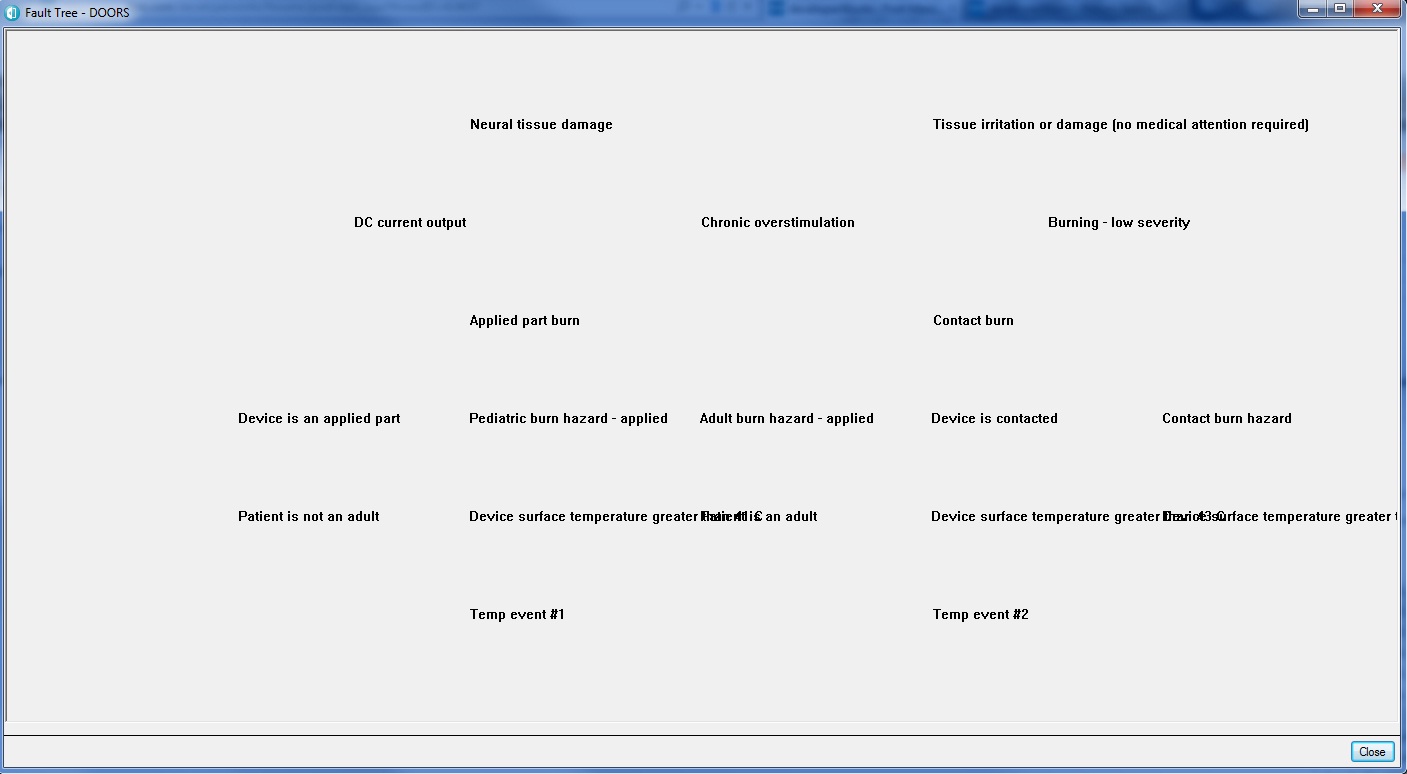
So what I'm basically trying to do is to create my own graphical visual view of a module by using links to show a fault tree instead of just using the hierarchy feature on doors. I know doors already has a "graphics mode on or off" feature. I'm trying to creating something similar to that by creating a dialog box with a canvas.

Is there a way to access the dxl code for the "graphics mode on or off"? or what do you guys think would be the best way to create this "tree diagram" in terms of if the string i'm painting onto the canvas is too long, how do i wrap the text

heres a picture of what i have so far and you can see why it's a problem. the text, if too long, overlaps w/ the next. i haven't drawn the lines to connect the links yet. thanks guys!
Attachments

attachment_14777901_Untitled.jpg

Re: Concatenate a Long String into a Smaller Text Pox on Canvas
Mathias Mamsch - Fri Jan 13 06:03:51 EST 2012

phan423 - Thu Jan 12 20:33:11 EST 2012
So what I'm basically trying to do is to create my own graphical visual view of a module by using links to show a fault tree instead of just using the hierarchy feature on doors. I know doors already has a "graphics mode on or off" feature. I'm trying to creating something similar to that by creating a dialog box with a canvas.

Is there a way to access the dxl code for the "graphics mode on or off"? or what do you guys think would be the best way to create this "tree diagram" in terms of if the string i'm painting onto the canvas is too long, how do i wrap the text

heres a picture of what i have so far and you can see why it's a problem. the text, if too long, overlaps w/ the next. i haven't drawn the lines to connect the links yet. thanks guys!

Well I guess in that case the code above should fit the purpose. You would only need to build in the 'word wrap', i.e. breaking the text only at word boundaries. Regards, Mathias
Mathias Mamsch, IT-QBase GmbH, Consultant for Requirement Engineering and D00RS